
Search results in the MyPE Business Directory will now show an image next to each for a number of the results.
“Why should I give a damn?” I hear you ask.
Simply because each of those images is dynamically loaded, in real time and directly from the web site of each of those businesses listed and this, in itself, is an indicator that the business web site in question is live and CURRENT.
Try this search to see what I mean: http://www.mype.co.za/cgi-bin/search.cgi?keywords=MyPE Community(OR scroll down to see a practical example). Please note that the images will ONLY be seen on the search pages and not the normal directory listings.
You will notice that even with the above search some web sites that you and I KNOW are live and current DO NOT show the image next to the business title. This is as a result of one or more of the reasons below:
- The image src is sourced as follows: http://YourBusinessWebSiteURL/favicon.ico
- If the business listed on MyPE does NOT have the trailing slash, is NOT the top level address (i.e. is a sub page) or does not have a web site then the image will not appear
- If the web site owner has not uploaded a favicon.ico to his/her web site then the image will not appear
- The Favicon is NOT in the ROOT of the web site (i.e. it appears in a sub folder)
Troubleshooting:
- Your favicon (if it has been uploaded) will appear next to your web site URL in your browser.
- To check if you DO have a favicon uploaded for your web site – go to the root of your site: http://YourBusinessWebSiteURL/favicon.ico and check if you can see an IMAGE (sometimes you will see the favicon in your browser and not in the root – then just place a copy of your favicon in the root of your web site.
- You can create your own Favicon by opening your business logo in your favourite graphics programme and reducing that image size to 32×32 OR 16×16 pixels in size, rename and save the image as favicon.ico and then upload the favicon.ico image to the ROOT (often reffered to as the public_html or www folder) of your website.
- You could also use this website to do the above: http://www.favicon.cc
- Lastly you will need to check if your URL in the MyPE Business Directory is in this form: http://www.mype.co.za/ (the trailing slash is VERY important).
Of course – if you do not have a web site then you will NOT see a favicon image at all for your free 041 business listing and we highly recommend that you give these guys a call forthwith.
Other web sites, search engines and directories use the favicon.ico in a similar manner so a little bit of effort will really help you in promoting your web site.
A Practical Example:
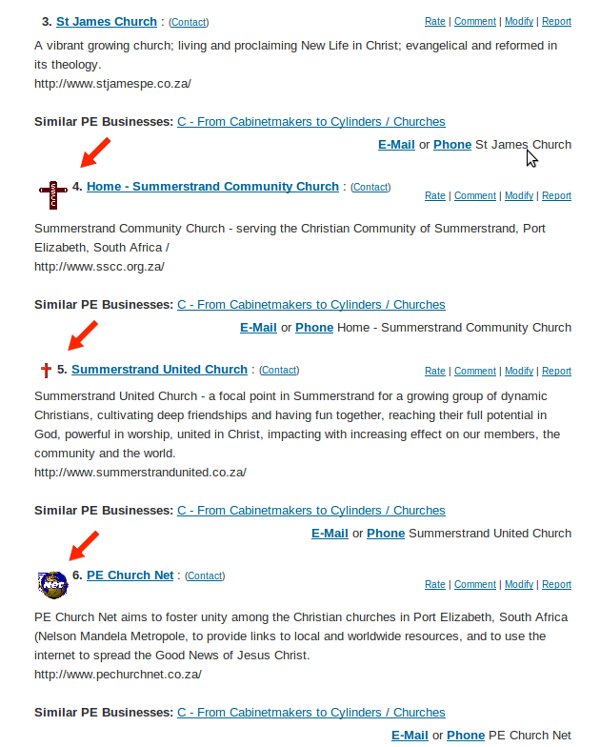
The screenshot from MyPE of a search for churches in Port Elizabeth below shows THREE churches that have the favicon image CORRECTLY installed in the root (the listings with the red arrow pointing at each). You will notice that the listing for St James Church does not show a favicon – a visit to the St James Church web site shows that no favicon appears in the browser address bar so they need to upload a favicon to the root of their site.


Alan Straton
Latest posts by Alan Straton (see all)
- The Gold Avenue Flags the 91.67% Krugerrand Seller Mistake - 16 October 2026
- Does Your Finance Team Spend More Time Preparing Reports Than Analysing Them? - 16 October 2026
- Acepak Showcases Pouch Fillers for Liquid and Food Producers - 16 October 2026
- Osteoporosis Warning Signs and Risk Factors - 16 October 2026
- Osteoporosis Warning Signs and Risk Factors - 16 October 2026
