
We all know the feeling one gets after uploading a data or audio file to our chosen AI offering and experiencing hours of frustration as we explore the limits imposed on file size, audio length or lines of data.
Remember: These limits are all dependant upon whether you are using free or paid versions of your favourite AI buddy.
Gemini:
MPr’s AI buddy of choice is Gemini from Google so it gets it’s very own section showing what size and length audio file/s one can upload and analyse.
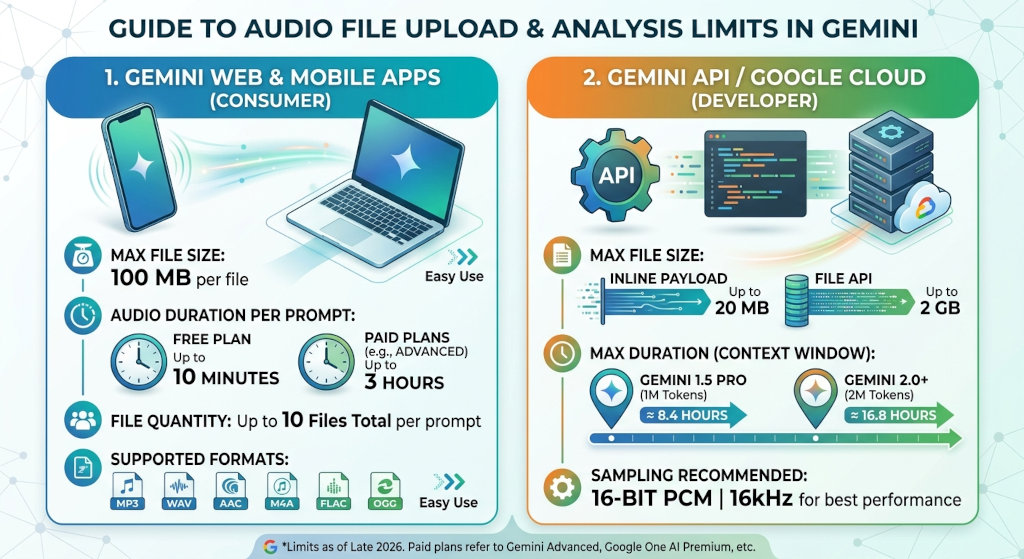
The limits for uploading and analysing audio files in Gemini depend on whether you are using the consumer web/app platform or developer API/Google Cloud tools.
1. Gemini Web & Mobile Apps
File Size: Up to 100 MB per non-video file.
Audio Duration (Free Plan): Up to 10 minutes of total audio per prompt.
Audio Duration (Paid Plans – Google Advanced / AI Pro / Ultra): Up to 3 hours of total audio per prompt.
File Quantity: You can attach up to 10 files total per prompt.
Supported Formats: Common formats including MP3, WAV, AAC, FLAC, M4A, and OGG.
2. Gemini API / Google Cloud (Developer Tools)
If you are passing audio via the API or Vertex AI / Google AI Studio:
Direct Inline Payload / File API: Up to 20 MB for inline payloads, or up to 2 GB via the File API.
Duration & Context Window: Governed by the model’s token capacity:
Gemini 1.5 Pro / 2.0+: Accepts up to 1 million to 2 million tokens (roughly 8.4 to 16.8 hours of continuous audio in a single request).
Sampling Requirements: Best performance occurs with raw 16-bit PCM audio sampled at 16kHz.
MyPR’s Gemini Experience:
We uploaded a 50 mb audio file to my free (but registered) Google Gemini account. The upload plus transcription to text took 2 minutes (see further down for our experience with AudioZu.
The text was neatly formatted with the names of the speakers AND an executive summary as a footnote.
No question as to which AI Buddy we will continue to use into the future.
Here is a handy October 2026 guide to the Audio limits across popular AI Offerings:
| Platform / Model | Max File Size | Max Audio Duration / Context | Primary Mechanism |
| Google Gemini (Web/App) | 100 MB per file | 10 mins (Free) / 3 hours (Advanced) | Native Multimodal (understands audio directly) |
| Google Gemini (API / 1.5 & 2.0) | 20 MB (Inline) / 2 GB (File API) | ~8.4 to 16.8 hours (1M – 2M tokens) | Native Multimodal |
| OpenAI ChatGPT (Plus / Pro) | 512 MB per file | Variable (Bounded by 2M token context) | Auto-transcribes using Whisper before analysis |
| OpenAI Whisper API | 25 MB per payload | No hard duration limit (~50 mins for 64kbps MP3) | Speech-to-Text Transcription |
| Anthropic Claude (Claude.ai) | 30 MB per file | N/A (Does not support raw audio directly) | Text / PDF / Image multimodal only |
| Deepgram Nova-3 API | 2 GB per file | Up to 8 hours (480 mins) | Dedicated Speech-to-Text Engine |
| AssemblyAI | 5 GB per file | Up to 10 hours | Dedicated Speech-to-Text Engine |
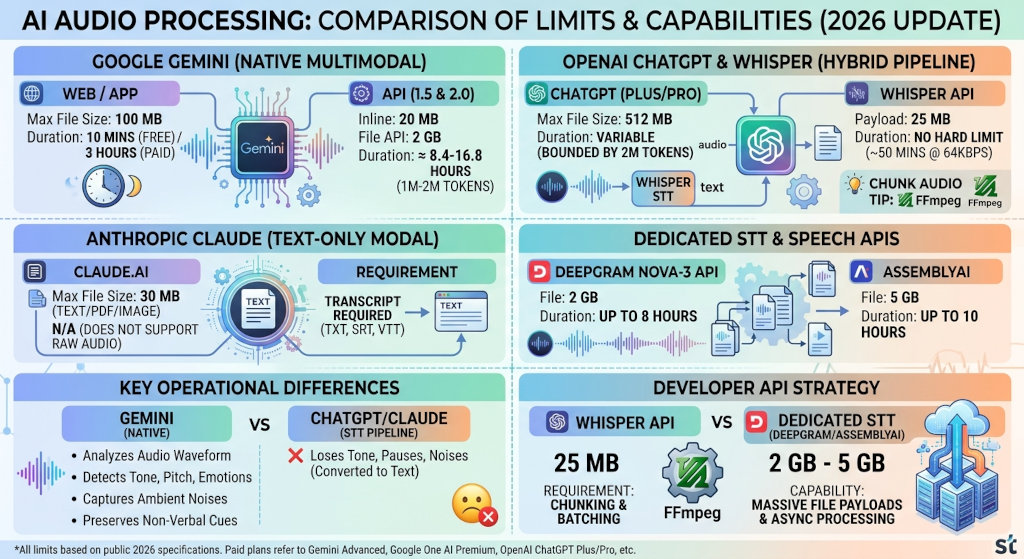
Key Operational Differences
Native Multimodal vs. Speech-to-Text Pipeline:
Gemini processes audio natively in its raw waveform. It can detect background ambient sounds, tone of voice, pitch changes, multiple speakers, and emotional cadence directly without converting it to text first.
ChatGPT converts uploaded audio into a text transcript behind the scenes using Whisper before passing the text to the model. This means non-verbal cues (such as tone, pauses, or background noise) are often lost during analysis.
Claude currently does not process raw audio uploads directly in its chat interface; audio files must first be transcribed into text or SRT/VTT format before feeding them to Claude.
Developer API Strategy:
OpenAI’s Whisper API enforces a tight 25 MB payload limit, requiring developers handling long recordings (like 2-hour meetings or podcasts) to split audio files into smaller chunks via toolkits like FFmpeg before processing.
Dedicated speech APIs like Deepgram and AssemblyAI handle massive file payloads (2 GB to 5 GB) specifically tailored for batch processing long-form recordings asynchronously.
Online audio file transcription (up to 100 MB) to text:
1. Built-in AI Assistants (No Separate Web App Needed)
Google Gemini (Web/App): You can upload audio files up to 100 MB directly into this chat. Prompt it with “Transcribe this audio file word-for-word” or “Provide a detailed transcript and summary.”
2. Dedicated Web-Based Transcription Tools
sipsip.ai / Deepgram Nova-3: Accepts file uploads (MP3, WAV, M4A, OGG, FLAC) up to 100 MB (approx. 60 minutes) without requiring a credit card.
AudioZuText: Specifically tailored for file uploads up to 100 MB on its free tier, supporting major audio formats across 100+ languages.
Proactor AI Audio-to-Text: Offers browser-based transcription for files up to 100 MB (and up to 30 minutes duration per upload) with direct export options to TXT or DOCX.
AudioTranscriber.io: Features a browser-based drag-and-drop tool that handles uploads up to 100 MB (and higher) with auto-speaker detection and no mandatory sign-up.
3. Alternative for Very Large Files or Free Local Processing
If your 100 MB file happens to exceed time limits on free web tools (for example, a heavily compressed low-bitrate MP3 that runs for several hours):
MacWhisper / Whisper Web (OpenAI Whisper): Runs locally in your web browser or application using WebAssembly/GPU acceleration. Because it processes locally on your device rather than uploading over the web, there are no strict file size caps.
Learn From MyPR’s Experience:
I visited and tested a 50mb audio file on the audio transcription at AudioZu – the only one on the list that allows a free trial without any sign up or credit card details AND the only one that had competitor sponsored Google Ads in the Google Search Engine – to me this is a signal that competitors are using the trade name (AudioZu) as keywords for their adverts so the platform must be popular.
After uploading and on AudioZu’s first pass the transcription into text failed. The second pass completed. The time it took from Upload to transcribed text was just under 10 minutes (including the first failed pass).
It was only once the text had transcribed that the sales pitch appeared – in order to download the transcribed text one has to create a free account that allows you to transcribe 2 x audio files per week.
You can also just copy and paste the unformatted text.
Creating an account and downloading the transcription (I choose the .doc format) also just presents you with a chunk of unformatted text – in case you were wondering.
As an experiment AudioZu was the only one of the above that actually proves what it does BEFORE collecting your e-mail address or forcing a sign-up.
Video:
https://www.youtube.com/playlist?list=PL1DARynQMarUx_zDvixfitYQuq9qjeYPK
What are the limits to upload and analyse an audio file using AI?
Links:
Boilerplate and Editor’s Notes.
More Info on What are the limits to upload and analyse an audio file using AI? here:
X: http://twitter.com/MyPRza
LinkedIn: https://www.linkedin.com/company/myprco/
Facebook: https://www.facebook.com/pages/Mypr/795496447138638
CLICK HERE to submit your press release to MyPR.co.za.
Track Your Press Release HERE:
Check Online Visibility
Verify where this release is currently indexed:


Alan Straton
Latest posts by Alan Straton (see all)
- South African Artist MARTHINUS Releases Debut Single - 6 November 2026
- MARTHINUS Releases Heartfelt Debut ‘i miss us not trying’ - 6 November 2026
- LaserWeeder Hire Runs Laser Units for SA Vegetable Growers - 6 November 2026
- Embroidery or Print? EMB Designs in Durban North Checks the Artwork and Runs a Sample Before a Full Staff, School or Club Order Is Stitched - 4 November 2026
- PrintAcademy 3D in Stellenbosch Trains Teachers First, Then Learners, so School 3D Printers Get Used Beyond the First Term - 4 November 2026
