
- Share how you turn ‘Reactions’ on Linkedin into ‘Comments’
- LiunkedIn Insider Tools to get more engagement
For MyPR it has only been a couple of months of regular posting of submitted press releases to our MyPR LinkedIn Account.
Make no mistake – it has been a rewarding journey BUT we are now looking for a way to turn those ‘Reactions’ into ‘Comments’. Input from readers would be highly appreciated.
In the meantime we have some theories of our own on how to do so.
Before we get there lets clarify that the traction for MyPR has included many reactions, a couple of comments, a decent amount of reposts, quite a few Profile Visits from some International and National recognised brands – all good indicators of positive and meaningful growth.
Because of the method we use to post to LinkedIn converting passive LinkedIn “reactions” (likes, hearts, celebrates) into active “comments” will require shifting our content strategy from broad agreement to conversation starters.
Because reactions require zero mental friction, audiences will default to a quick double-tap unless our posts specifically prompt them to type a response.
We then need to do the following:
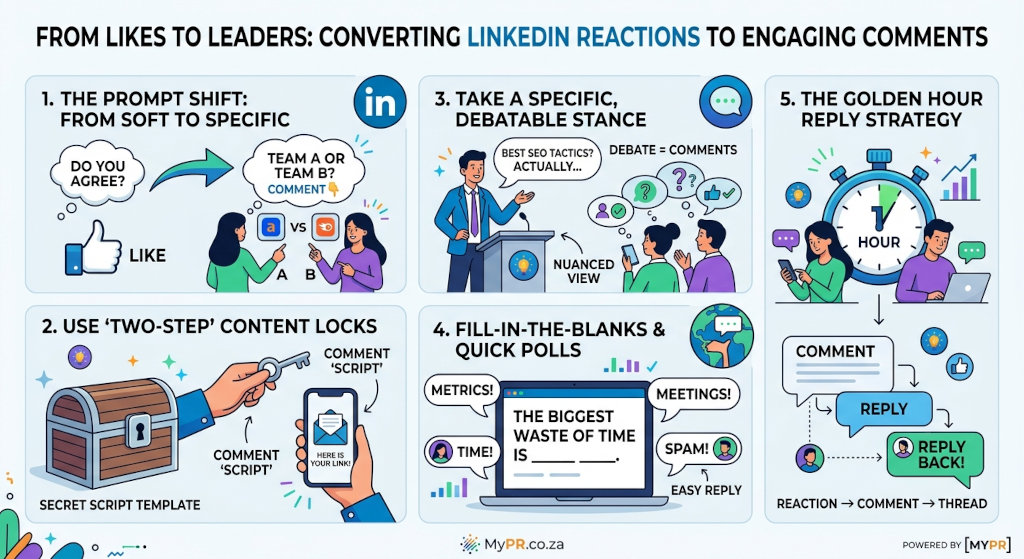
Re-frame Our Post Closings (The Prompt Shift)
Avoid Soft Questions: Closing a post with general questions like “What do you think?” or “Do you agree?” leads to passive agreement (a Like).
Use Forced-Choice / Option Prompts: Give them explicit choices to make commenting lower-friction.
Instead of: “What’s your favourite SEO tool?”
Try: “Are you team Ahrefs or team Semrush? Let me know in the comments.”
Ask for Specific Examples: Ask people to contribute their own tactical experience.
Example: “What’s the one plugin you install on every new WordPress site? Drop it below.”
The “Two-Step” Content Lead Magnet Strategy
One of the most effective ways to turn reactions into comments is to lock a resource behind a comment trigger rather than dropping a direct link in the post:
The Pitch: Share an overview or teaser of a guide, template, code snippet, or video script.
The Call to Action: Tell readers to comment with a specific keyword to receive the link or download in a direct message or reply.
Example: “Want my full 60-second video script template for converting blog posts into YouTube Shorts? Comment ‘SCRIPT’ below and I’ll send it over.”
Take a Specific, Debatable Stance (The “Hot Take”)
Polite, agreeable advice receives Likes; strong, nuanced perspectives receive Comments.
Express an opinion that challenges common industry practices or invites healthy debate.
Example: “Stop chasing standard SEO tactics—the best search marketers learned their core conversion and speed strategies from the early adult web industry.”
A bold statement prompts readers to reply either to agree with their own experience or offer a counter-perspective.
Create “Fill-in-the-Blank” or Poll-Style Copy
Lower the barrier to typing by making the required comment as short as possible:
Example: “Complete this sentence: The biggest waste of time in digital marketing is _________.”
Example: “In 3 words or less, describe your current website migration experience.”
Leverage the “Golden Hour” Reply Strategy
When someone leaves a reaction, or when your post first goes live:
Reply to early commenters immediately: LinkedIn’s algorithm prioritizes active conversation threads. Replying with an open-ended question to early comments turns 1 comment into 3–4 nested comments.
Tag specific connections (when relevant): If you know an industry connection or colleague has a strong view on the topic, tag them in a comment to kick off the discussion: “Curious to hear your take on this, @[Name]!”
Get More Followers:
At present MyPR is in a building phase so our number of followers on LinkedIn are small, but growing.
We could buy more followers with adverts but prefer the slow and steady growth path of relying on people to find our content and decide off of their own bat to follow our LinkedIn page – it has been our experience that these followers are more loyal and engaged than any that have been ‘bought’.
This did work for our @MyPE X Account which has grown to just under 8000 followers with ABSOLUTELY no accounts that we follow back. Sure, it took a couple of years but we are in it for the long haul so are prepared to wait a tad.
Images:
Video:
https://www.youtube.com/playlist?list=PL1DARynQMarUx_zDvixfitYQuq9qjeYPK
How to Turn ‘Reactions’ on Linkedin Into ‘Comments’
Links:
Boilerplate and Editor’s Notes.
More Info on How to Turn ‘Reactions’ on Linkedin Into ‘Comments’ here:
X: https://x.com/MyPRza
LinkedIn: https://www.linkedin.com/company/myprco/
Facebook: https://www.facebook.com/pages/Mypr/795496447138638
CLICK HERE to submit your press release to MyPR.co.za.
Track Your Press Release HERE:
Check Online Visibility
Verify where this release is currently indexed:


Alan Straton
Latest posts by Alan Straton (see all)
- The Carpet Stain Remover That Leaves a Bigger Problem - 2 November 2026
- The Carpet Stain Remover That Leaves a Bigger Problem - 2 November 2026
- South African Conquers Rats on the World Stage - 30 October 2026
- Old JPG on a Memory Stick? Vectorization Studio in Observatory Redraws Faded and Low-Resolution Logos by Hand - 30 October 2026
- ReAutomated Adds Robot Palletising and Case Packing Cells to Existing South African Packing Lines Without Stripping Out the Conveyors - 30 October 2026
