
We find it so gratifying when hearing how people use the MyPE Business Directory when looking for business and product in the 041 area (Port Elizabeth, Uitenhage and Despatch).
In the past we have fiddled with creating a browser bar to allow people to search the MyPE site but have always felt that the solutions offered were a little bit manky, clunky and not elegant enough.
Along comes an add-on for Firefox that incorporates itself with the standard Firefox browser search bar and makes adding your favourite search box a snap.
And, adding three Port Elizabeth search engine boxes from MyPE was quick, intuitive and easy.
To get this functionality follow these steps:
- Install the Add to Search Bar (free) add-on for Firefox.
- Open up MyPE.
- Right click in the Google Search Bar and click on Add to Search Bar – this search box will search the ENTIRE MyPE site: News, Business and Classifieds.
- To search ONLY the MyPE Business Directory you will need to scroll down a tad and right click on the search box in the RHS Sidebar to add the box to your browser.
- To search the Classified Ads only go to this classified ads page and right click in the search box there.
See images below:
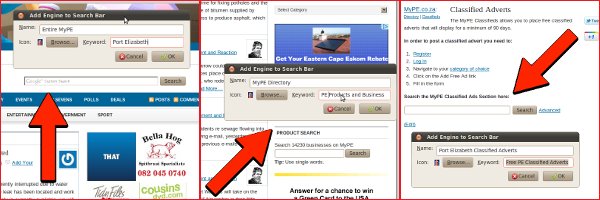
Add to Search Bar also gives you options to manage your search engines so you can move the MyPE search options to the top of the list or, by adding keywords, you can search direct from the navigation bar.
Finding the contact details of a Port Elizabeth business just got a whole lot easier.


Alan Straton
Latest posts by Alan Straton (see all)
- The Holiday Souvenir Nobody Wants: Bed Bugs in the Luggage - 25 October 2026
- Desktop Pop-Ups Become the Compliance Channel Email Cannot Deliver - 23 October 2026
- Desktop Pop-Ups Become the Compliance Channel Email Cannot Deliver - 23 October 2026
- Reasons Why You Shouldn’t Use Your Company/Brand Name in a Press Release Title - 23 October 2026
- Reasons Why You Shouldn’t Use Your Company/Brand Name in a Press Release Title - 23 October 2026
